Deploying Software
GitFlow: Branching and Deployment Strategy
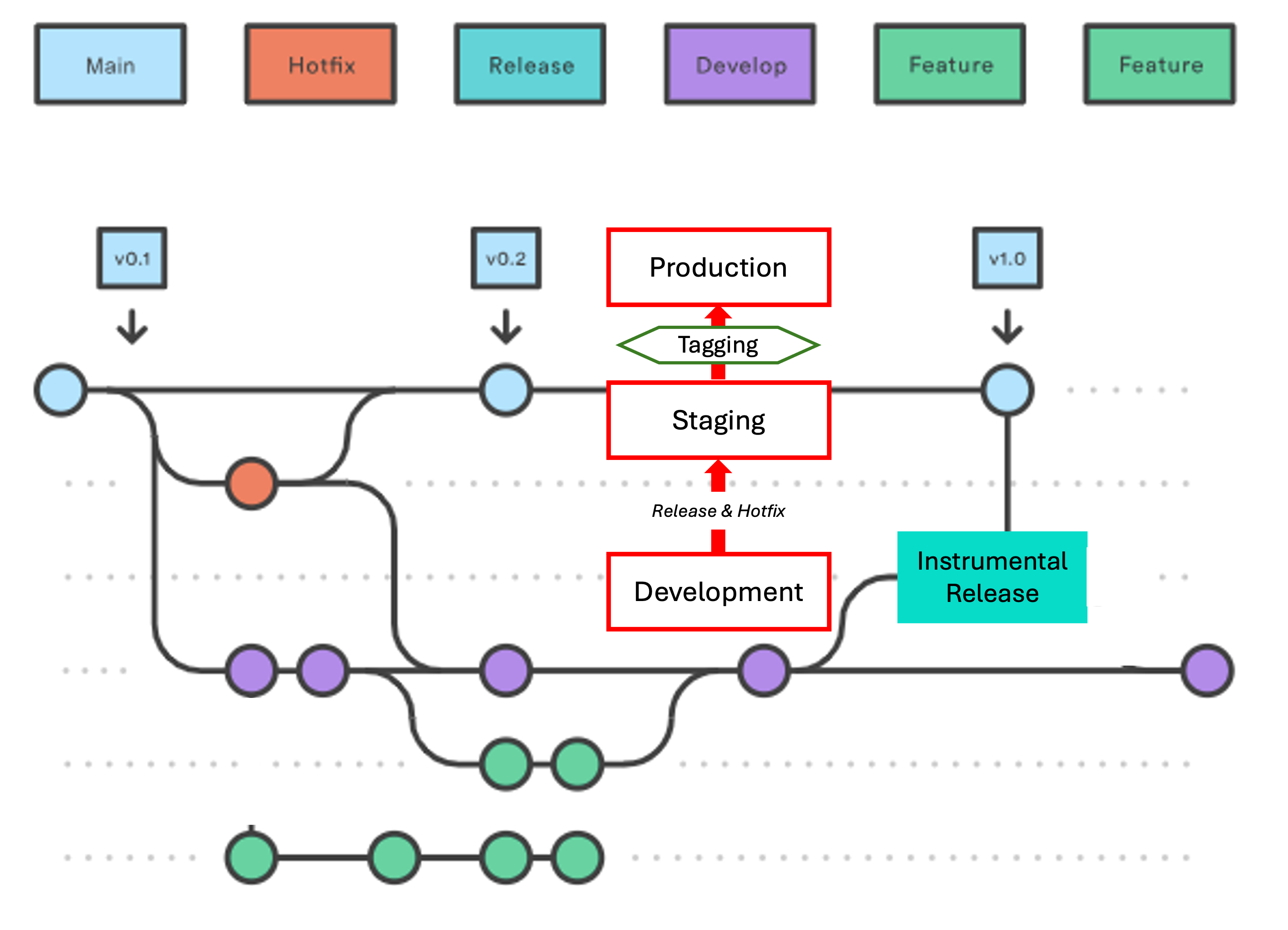
Main Branch
Known as main, it is a permanent branch and is only updated whenever a new software version is promoted to Production from the Release or Hotfix branch. Each new version is always associated with a Tag corresponding to a Docker Image.
Develop Branch
Known as dev, it is a permanent branch where continuous work is performed. Commits are made as needed until a new version of the Gradewing software is ready for deployment to Stage.
Release Branch
This is a temporary branch called Release. Commits are never made directly to this branch.
- It is created via "New Branch" in GitHub, using
devas the source branch. - Using the software included in this branch, a deployment to Stage is performed from the Hetzner terminal, where the new software will be exhaustively tested.
- Once the software is certified, a Tag is applied, and the corresponding Docker Image is labeled.
- Using this tagged Docker Image, the deployment to Production is carried out (without a new build).
- Next, a merge is performed within the Hetzner terminal from the
Releasebranch intomain. At this point, the three branches are leveled (excluding any commits made todevafter theReleasebranch was created). - Finally, the temporary
Releasebranch is deleted from both Hetzner and GitHub, leaving only the two permanent branches:devandmainin GitHub.
Hotfix Branch
This is a temporary and exceptional branch called Hotfix. Usually, only a single commit is made on this branch to push an urgent fix to Production.
- It is created via "New Branch" in GitHub, using
mainas the source branch. - Using the software included in this branch, usually a single commit, an urgent deployment to Stage is performed from the Hetzner terminal.
- Once verified, a Tag is applied, and the corresponding Docker Image is labeled.
- Using this tagged Docker Image, the deployment to Production is carried out (without a new build).
- Next, a merge is performed within the Hetzner terminal from the
Hotfixbranch intomain, and after from themainintodev. This ensures that bothHotfixandmainbranches are leveled (noting thatdevmay have accumulated many previous commits). - Finally, the temporary
Hotfixbranch is deleted from both Hetzner and GitHub, leaving only the two permanent branches:devandmainin GitHub.
Stage Environment: New Version Deployment
1. Creation of a new Release branch on GitHub
- Create new Branch
- New Branch name: Release
- Source: dev
2. Connection to Hetzner and positioning in Gradewing from the terminal
First, log in via SSH to the server:
ssh root@46.62.132.133
cd gradewing
cd gradewing
Once you are positioned at root@gradewing-server:~/gradewing/gradewing#, you can run the necessary commands to deploy the software from GitHub.
3. Localizing the software from the Release branch on the Hetzner server
git fetch origin
git checkout Release
git pull origin Release
4. Execution permissions
chmod +x ./run/*.sh
5.1 Deployment to Stage of the new branch software already localized in Hetzner (keeping current data)
./run/03-start_staging.sh
5.2 Deployment to Stage by deleting current data and, optionally, loading Production data
Alternative Staging Data Cleanup Process.
./run/04-stop_staging.sh
./run/03-start_staging.sh
Depending on the magnitude of the changes made, it might be advisable to replicate the Production data so as not to start with an empty environment.
./run/21-restore_to_staging.sh
6. Removes only orpahed data and dangling images
docker volume prune
docker image prune
7. Stage Environment Verification
By executing a single command, we verify the deployment in Stage (see Appendix I).
check-stage # -- VERIFICATION
Release Branch Deleted: Staging Certification Failed
1. Connection to Hetzner and positioning in Gradewing from the terminal
First, log in via SSH to the server:
ssh root@46.62.132.133
cd gradewing
cd gradewing
Once you are positioned at root@gradewing-server:~/gradewing/gradewing#, you can run the necessary commands to deploy the software from GitHub.
2. Deletion of Release branch
git fetch origin
git checkout main
git branch -D Release
git push origin --delete Release
3. Verification of branch status in Hetzner and GitHub
git branch -a # -- VERIFICATION
Correct state of the branches
main - remotes/origin/HEAD -> origin/main - remotes/origin/dev - remotes/origin/main
Production Environment: Stage-Certified Deployment
1. Connection to Hetzner and positioning in Gradewing from the terminal
First, log in via SSH to the server:
ssh root@46.62.132.133
cd gradewing
cd gradewing
Once you are positioned at root@gradewing-server:~/gradewing/gradewing#, you can run the necessary commands to deploy the software from GitHub.
2. Execution permissions
chmod +x ./run/*.sh
3. Docker Image Tagging (Image: gradewing-web:vn.n) and software on GitHub (Tag: vn.n)
This script identifies the most recent 'gradewing-web' image. Calculate a new version by adding 1 to the first digit, and use it in the posterior tagging script.
docker images --format "{{.Tag}}\t{{.CreatedSince}}" gradewing-web | grep "^v" # -- VERIFICATION
./run/10-tag_web.sh
Just in case.
docker images --format "{{.Tag}}\t{{.CreatedSince}}" gradewing-web | grep "^v" # -- VERIFICATION
4. Deployment of the tagged Docker image to Production (without Build)
./run/05-start_production.sh
5. Production Environment Verification
With a single command, we verify the deployment in Production (see Appendix II).
check-prod # -- VERIFICATION
6. Merge into main from the Release branch, and deletion of said branch in Hetzner and GitHub
git fetch origin
git checkout main
git pull origin main
The terminal should have shown: * branch main -> FETCH_HEAD - Already up to date
git reset --hard Release
git diff main..origin/Release # -- VERIFICATION
Nothing should have been displayed on the terminal
git push origin main --force
git diff origin/main..origin/Release # -- VERIFICATION
Nothing should have been displayed on the terminal
git log main..origin/dev --oneline # -- VERIFICATION
Pending commits from the dev branch will be displayed
git branch -D Release
git push origin --delete Release
7. Verification of branch status in Hetzner and GitHub
git branch -a # -- VERIFICATION
Correct state of the branches
main - remotes/origin/HEAD -> origin/main - remotes/origin/dev - remotes/origin/main
Production Environment: Hotfix Deployment
1. Creation of a new Release branch on GitHub
- Create new Branch
- New Branch name: Hotfix
- Source: main
2. Software Changes on the Hotfix Branch
Instead of using the terminal, apply the fix directly through your browser:
- Switch Branch: In the "Branch" dropdown menu, select the
Hotfixbranch. - Edit Files: Navigate to the file(s) requiring the fix and click the pencil icon (Edit this file).
- Apply Fix: Modify the code as needed within the editor.
- Commit Changes:
- Scroll down to the "Commit changes" section.
- Add a descriptive title.
- Select "Commit directly to the Hotfix branch".
- Click Commit changes.
3. Connection to Hetzner and positioning in Gradewing from the terminal
First, log in via SSH to the server:
ssh root@46.62.132.133
cd gradewing
cd gradewing
Once you are positioned at root@gradewing-server:~/gradewing/gradewing#, you can run the necessary commands to deploy the software from GitHub.
4. Localizing the software from the Hotfix branch on the Hetzner server
git fetch origin
git checkout Hotfix
git pull origin Hotfix
5. Execution permissions
chmod +x ./run/*.sh
6.1 Deployment to Stage of the new branch software already localized in Hetzner (keeping current data)
./run/03-start_staging.sh
6.2 Deployment to Stage by deleting current data and, optionally, loading Production data
Alternative Staging Data Cleanup Process.
./run/04-stop_staging.sh
./run/03-start_staging.sh
It might be advisable to replicate Production data to avoid starting with an empty environment.
./run/21-restore_to_staging.sh
7. Removes only orpahed data and dangling images
docker volume prune
docker image prune
8. Stage Environment Verification
By executing a single command, we verify the deployment in Stage (see Appendix I).
check-stage # -- VERIFICATION
9. Docker Image Tagging (Image: gradewing-web:vn.n) and software on GitHub (Tag: vn.n)
This script identifies the most recent 'gradewing-web' image. Calculate a new version by adding 1 to the second digit, and use it in the posterior tagging script.
docker images --format "{{.Tag}}\t{{.CreatedSince}}" gradewing-web | grep "^v" # -- VERIFICATION
./run/10-tag_web.sh
Just in case.
docker images --format "{{.Tag}}\t{{.CreatedSince}}" gradewing-web | grep "^v" # -- VERIFICATION
10. Deployment of the tagged Docker image to Production (without Build)
./run/05-start_production.sh
11. Production Environment Verification
With a single command, we verify the deployment in Production (see Appendix II).
check-prod # -- VERIFICATION
12. Merge into main from the Hotfix branch
git fetch origin
git checkout main
git pull origin main
The terminal should have shown: * branch main -> FETCH_HEAD - Already up to date
git merge Hotfix --ff-only
git diff main..origin/Hotfix # -- VERIFICATION
git push origin main
git diff origin/main..origin/Hotfix # -- VERIFICATION
git diff main..Hotfix # --VERIFICATION
13. Merging main into dev (Integration)
Once the software is fixed, you must synchronize it with your development history to ensure the fix is preserved:
- Open Pull Request: Go to the "Pull requests" tab and click "New pull request".
- Compare Branches:
- Set base:
dev - Set compare:
main
- Set base:
- Merge Process:
- If GitHub says "Able to merge", click Create pull request.
- Review the changes and click Merge pull request - Create a merge commit, then Confirm merge.
14. Deletion of Hotfix branch in Hetzner and GitHub
git branch -d Hotfix
git push origin --delete Hotfix
15. Verification of branch status in Hetzner and GitHub
git branch -a # -- VERIFICATION
Correct state of the branches
main - remotes/origin/HEAD -> origin/main - remotes/origin/dev - remotes/origin/main
Disaster Recovery: Version Rollback with Data Preservation
Critical Disaster Recovery
This procedure must ONLY be used in the event of a critical failure in the current Production version. The objective is to perform a Rollback to a stable previous version while strictly preserving the existing database.
1. Connection to Hetzner and positioning in Gradewing from the terminal
First, log in via SSH to the server:
ssh root@46.62.132.133
cd gradewing
cd gradewing
Once you are positioned at root@gradewing-server:~/gradewing/gradewing#, you can run the necessary commands to deploy a stable previousversion.
2. Deploying an older Docker Image
This script identifies the last five 'gradewing-web' images. Please choose the one you intend to use for the production deployment (normally the penultimate one).
docker images --format "{{.Tag}}\t{{.CreatedSince}}" gradewing-web | grep "^v" # -- VERIFICATION
./run/05-start_production.sh
The image currently used by 'GradewingDjango_production' will be displayed. Please verify that it is correct.
docker ps --format "table {{.Names}}\t{{.Image}}\t{{.Status}}" # -- VERIFICATION
3. Production Environment Verification
With a single command, we verify the deployment in Production (see Appendix II).
check-prod # -- VERIFICATION
4. Removing Rollbacked Tag
This script allows you to remove a specific Tag (e.g., v2.0) from an image ID. If other tags (like 'staging') share the same ID, the physical data will remain safe and 'In Use' (see Appendix III).
untag-gradewing
Critical: Production Database Restoration
Destructive restore of the Production Database
All current data in GradewingDjango_production will be overwritten with the selected backup file
1. Connection to Hetzner and positioning in Gradewing from the terminal
First, log in via SSH to the server:
ssh root@46.62.132.133
cd gradewing
cd gradewing
Once you are positioned at root@gradewing-server:~/gradewing/gradewing#, you can run the necessary commands to deploy a stable previousversion.
2. Pre-Restore Analysis
# 1. Load variables from .env into your current session
export $(grep -v '^#' .env | xargs)

# 2. Set the container name (since it's usually not in .env)
PROD_DB_CONTAINER="GradewingPostgres_production"
BACKUP_DIR="./db_backups"

# 3. Analysis:
docker exec -i "$PROD_DB_CONTAINER" psql -U "$POSTGRES_USER" -d "$POSTGRES_DB" -c "SELECT count(*) AS total_migrations FROM django_migrations;"
3. Emergency Snapshot (The "Undo" Button)
echo "🛡️ Creating emergency pre-restore snapshot..."
docker exec -i "$PROD_DB_CONTAINER" pg_dump -U "$POSTGRES_USER" "$POSTGRES_DB" | gzip > "$BACKUP_DIR/emergency_pre_restore_$(date +%F_%H%M).sql.gz"
echo "✅ Snapshot saved to: $BACKUP_DIR"
4. The Restore Script
./run/22-restore_to_production.sh
5. Production Environment Verification
With a single command, we verify Production environment (see Appendix II).
check-prod # -- VERIFICATION
Docker Audit & Git Integrity
Security Audit: Docker Environment
A comprehensive diagnostic tool to verify the health, security, and storage efficiency of the Gradewing environment.
Simply run the following command (see Appendix IV) in the terminal:
docker-audit
list of Docker Images and Containers
docker images
docker ps
docker ps -a --filter "name=Gradewing" --format "table {{.ID}}\t{{.Names}}\t{{.Image}}\t{{.Status}}" # -- GRADEWING
Integrity Check: Git Repository
No Local Software Modifications on Production
Simply run the following command (see Appendix V) in the terminal:
check-git-integrity
Publishing Gradewing Guide
1. Creation of a new Release branch on GitHub (Repository: gradewing_guide)
- Create new Branch
- New Branch name: Release
- Source: dev
2. Connection to Hetzner and positioning in gradewing_guide from the terminal
First, log in via SSH to the server:
ssh root@46.62.132.133
cd gradewing_guide
Once you are positioned at root@gradewing-server:~/gradewing_guide#, you can run the necessary commands to publish the Gradewing Guide.
3. Release deploy to Hetzner + Docs publish
source venv/bin/activate
git fetch origin
git checkout Release
mkdocs gh-deploy
git checkout main
git reset --hard Release
git push origin main --force
git branch -D Release
git push origin --delete Release
deactivate
The documentation will be available at https://pablopenlop.github.io/gradewing_guide/
Miscellaneous & Maintenace
Backups Status
Show status of the automatic (three per day) Backups.
echo "--- ESPACIO EN DISCO ---" && df -h / | grep / && \
echo -e "\n--- ÚLTIMOS 3 BACKUPS ---" && ls -lh /root/gradewing/gradewing/db_backups/*.gz | tail -n 3 && \
echo -e "\n--- RESULTADO ÚLTIMO LOG ---" && tail -n 10 /root/gradewing/gradewing/backups_logs/backup_prod.log | grep -E "INICIO|✅|ÉXITO"
Execution permissions. In case it is necessary.
chmod 755 /root/gradewing/gradewing/run/20-backup_production.sh
Git Credential Automation (Token Storage)
Configures the local environment to securely cache GitHub credentials, eliminating the need for manual authentication during Git operations.
git config --global credential.helper store
Perform this once. The first time you run a git fetch afterward, enter your GitHub Personal Access Token (PAT) as the password. It will be saved indefinitely.
Environment Configuration Reload
Synchronizes the current terminal session with the latest updates made in aliases and functions.
source ~/.bashrc
Execute this command immediately after modifying aliases or custom functions to apply changes without re-establishing the SSH connection.
Risk-Free Docker Cleanup
Removes only "orphaned" data.
docker volume prune
Removes only dangling images.
docker image prune
Code Integrity Reset
To discard any manual changes made on the Hetzner server and force the code to match GitHub exactly.
git fetch origin main
git reset --hard origin/main
git clean -fd
Emergency Log Inspection
To quickly identify errors in the application or background workers.
docker logs --tail 100 -f GradewingDjango_production
docker logs GradewingDjango_production 2>&1 | grep -Ei "error|critical|exception"
Quick Procedures
Remove Git Pre-Commit Hook
Local Git Policy: Branch Protection Hook
Currently, a pre-commit hook is active in this repository to prevent accidental direct commits to the main branch. This ensures that all development follows the standard workflow (Release or Hotfix branches) before merging into production. If you need to deactivate this restriction, follow the standard decommissioning procedure below.
Verify permissions and existence
ls -l .git/hooks/pre-commit
Review the content (Safety check)
cat -n .git/hooks/pre-commit
Delete the hook
rm .git/hooks/pre-commit
Incorporate New Bash Function
To add a new function to your environment safely, follow these 3 steps:
Add the new function
Open your functions file and paste the new code
nano ~/.bash_functions
Check syntax
bash -n ~/.bash_functions
Activate the changes
source ~/.bash_functions
Your new function is now ready to use. You can call it directly from your terminal just like any other command.
Appendix: Shell Aliases and Functions
They will only be used when an alias or function needs to be rebuilt. Initially, this was never supposed to happen.
Appendix I: Command to create the check-stage alias
To simplify the verification of the Stage environment, we use a custom alias that checks build status, images, resources, network, database migrations, Redis, and logs in a single execution.
Installation
Run the following command in your Hetzner terminal to add the alias to your ~/.bashrc and activate it:
echo "alias check-stage='echo \"\n🔨 --- 1. BUILD STATUS & IMAGE ID ---\" && docker images | grep staging && echo \"\n🧹 --- 2. DANGLING IMAGES (Build Junk) ---\" && docker images -f \"dangling=true\" || echo \"No junk images\" && echo \"\n📊 --- 3. STAGING RESOURCES ---\" && docker stats --no-stream | grep staging && echo \"\n🌐 --- 4. STAGING NETWORK ---\" && docker network ls | grep staging && echo \"\n🧼 --- 5. STAGING DB & REDIS ---\" && docker exec GradewingDjango_staging python manage.py showmigrations | grep \"\[ \]\" || echo \"All migrated in Stage\" && docker exec GradewingDjango_staging python manage.py shell -c \"from django.core.cache import cache; cache.set('\''test'\'', '\''ok'\'', 5); print('\''Redis Stage Status:'\'', cache.get('\''test'\''))\" && echo \"\n⚠️ --- 6. BUILD & RUN LOGS ---\" && docker compose -f docker-compose.staging.yml logs --tail=50 | grep -Ei \"error|critical|fail\" || echo \"No errors in Staging\"'" >> ~/.bashrc && source ~/.bashrc
Appendix II: Command to create the check-prod alias
To ensure the Production environment is running correctly, this custom alias performs a comprehensive check of versions, resources, storage, and database health in a single command.
Installation
Run the following command in your Hetzner terminal to add the alias to your ~/.bashrc and activate it:
echo "alias check-prod='echo \"\n🚀 --- 1. STATUS & VERSIONS ---\" && docker ps --filter \"name=production\" --format \"table {{.Names}}\t{{.Status}}\t{{.Image}}\" && echo \"\n📦 --- 2. DOCKER IMAGES (vX.X check) ---\" && docker images | grep -E \"REPOSITORY|v[0-9]|staging\" | head -n 6 && echo \"\n📊 --- 3. RESOURCE USAGE (Stats) ---\" && docker stats --no-stream && echo \"\n🌐 --- 4. NETWORK ISOLATION ---\" && docker network ls | grep gradewing && echo \"\n💾 --- 5. DISK SPACE (Server) ---\" && df -h / && echo \"\n📂 --- 6. DOCKER SYSTEM DF ---\" && docker system df && echo \"\n🧼 --- 7. REDIS & MIGRATIONS ---\" && docker exec GradewingDjango_production python manage.py showmigrations | grep \"\\\[ \\\]\" || echo \"All migrated\" && docker exec GradewingDjango_production python manage.py shell -c \"from django.core.cache import cache; cache.set('\''test'\'', '\''ok'\'', 5); print('\''Redis Status:'\'', cache.get('\''test'\''))\" && echo \"\n⚠️ --- 8. ERRORS (Last 100 lines) ---\" && docker compose -f docker-compose.production.yml logs --tail=100 | grep -Ei \"error|critical|fail\" || echo \"No critical errors found\"'" >> ~/.bashrc && source ~/.bashrc
Appendix III: Command to create the untag-gradewing function
Installation
Run the following command in your Hetzner terminal to add the alias to your ~/.bashrc and activate it:
untag-gradewing() {
    echo "--- REMOVING ROLLBACKED TAG ---"

    # Standard Docker fields: Repository, Tag, ID, and Created
    docker images gradewing-web --format "Tag: {{.Tag}} \t ID: {{.ID}} \t Created: {{.CreatedSince}}"
    echo "--------------------------------------------------------"

    read -p "Enter the TAG to remove (e.g., v2.0): " TAG_TO_REMOVE

    if [[ "$TAG_TO_REMOVE" == "staging" || "$TAG_TO_REMOVE" == "v1.0" ]]; then
        echo "ERROR: Protection enabled. Cannot remove '$TAG_TO_REMOVE'."
    elif [ -z "$TAG_TO_REMOVE" ]; then
        echo "Cancelled: No tag entered."
    else
        echo "Untagging gradewing-web:$TAG_TO_REMOVE..."
        docker rmi gradewing-web:"$TAG_TO_REMOVE"

        echo "--------------------------------------------------------"
        echo "Updated Status:"
        docker images gradewing-web --format "Tag: {{.Tag}} \t ID: {{.ID}}"
    fi
}
Appendix IV: Command to create the docker-auditfunction
Installation
Run the following command in your Hetzner terminal to add the alias to your ~/.bashrc and activate it:
docker-audit() {
    echo -e "🔍 --- DOCKER SYSTEM AUDIT & HEALTH CHECK --- 🔍"

    # 1. CONTAINER HEALTH
    echo -e "\n⚠️  1. CONTAINER HEALTH"
    ERRORS=$(docker ps -a --filter "status=restarting" --filter "status=exited" --format "{{.Names}}: {{.Status}}" | grep -vi "Certbot")
    [ -z "$ERRORS" ] && echo "✅ Critical containers are Healthy." || echo -e "❌ ALERT: Crashing/Stopped:\n$ERRORS"

    # 2. SSL
    echo -e "\n🔐 2. SSL CERTIFICATE EXPIRY"
    SSL_DATE=$(timeout 2s openssl s_client -connect localhost:443 -servername gradewing.com </dev/null 2>/dev/null | openssl x509 -noout -dates | grep notAfter)
    echo "${SSL_DATE:-"⚠️ Could not verify SSL (Nginx down?)"}"

    # 3. STORAGE
    echo -e "\n📊 3. STORAGE & RECLAIMABLE"
    docker system df
    HAS_WASTE=$(docker system df | grep -qE "(8[0-9]%|9[0-9]%|100%)" && echo "YES")

    # 4. VOLUMES
    echo -e "\n💾 4. ORPHANED VOLUMES"
    UNUSED_VOLS=$(docker volume ls -f "dangling=true" -q)
    VOL_COUNT=$(echo "$UNUSED_VOLS" | grep -v '^$' | wc -l)
    [ "$VOL_COUNT" -eq 0 ] && echo "✅ No orphaned volumes." || echo "⚠️  WARNING: $VOL_COUNT orphaned volumes found."

    # 5. RECOMMENDATIONS (The Intelligent Part)
    echo -e "\n💡 --- SMART RECOMMENDATIONS ---"
    REC_FOUND=0

    if [ "$VOL_COUNT" -gt 0 ]; then
        echo "- [VOLUMES] Clean $VOL_COUNT orphaned volumes: 'docker volume prune'"
        REC_FOUND=1
    fi

    if [ "$HAS_WASTE" == "YES" ]; then
        echo "- [IMAGES] Recover space from old versions: 'docker image prune -a'"
        echo "  (Note: Your active 'v1.0' and 'staging' are PROTECTED and won't be deleted)"
        REC_FOUND=1
    fi

    if [ -n "$ERRORS" ]; then
        echo "- [REPAIR] Check logs for crashing containers: 'docker logs [NAME]'"
        REC_FOUND=1
    fi

    [ "$REC_FOUND" -eq 0 ] && echo "✅ System is optimized. No actions required."

    echo -e "\n✅ Audit Complete."
}
Appendix V: Command to create the check-git-integrityfunction
Installation
Run the following command in your Hetzner terminal to add the alias to your ~/.bashrc and activate it:
check-git-integrity() {
    echo -e "🔍 --- GIT REPOSITORY INTEGRITY CHECK --- 🔍"

    # 1. Update the local knowledge of the remote (GitHub)
    echo "Fetching latest metadata from GitHub..."
    git fetch origin main -q

    # 2. Check for "Dirty" Code (Local uncommitted changes)
    echo -e "\n📝 1. LOCAL MODIFICATIONS (Dirty Code)"
    if git diff --quiet; then
        echo "✅ No local modifications found. Code is pristine."
    else
        echo "❌ ALERT: Local software modifications detected!"
        git status -s
        echo "💡 Recommendation: Run 'git reset --hard' to discard local changes."
    fi

    # 3. Check for "Drift" (Local main vs Remote main)
    echo -e "\n🚀 2. REMOTE ALIGNMENT (GitHub vs Hetzner)"
    LOCAL=$(git rev-parse @)
    REMOTE=$(git rev-parse @{u})
    BASE=$(git merge-base @ @{u})

    if [ $LOCAL = $REMOTE ]; then
        echo "✅ Up-to-date: Hetzner is perfectly synced with GitHub."
    elif [ $LOCAL = $BASE ]; then
        echo "⚠️  BEHIND: GitHub has new commits. Run 'git pull' to update."
    elif [ $REMOTE = $BASE ]; then
        echo "❌ FORWARD: Hetzner has local commits not on GitHub! (Restricted)"
    else
        echo "🚨 DIVERGED: Both sides have different changes. Manual fix required."
    fi

    echo -e "\n✅ Integrity Check Complete."
}